Access check
What this is: the path every request takes to be allowed or refused, and what each refusal looks like. Who it is for: tenant admins who must explain why a person was refused. You will learn: who asks the policy check, what it is told, and what happens on a deny, on a check outage and for an unknown person.
Who asks, and with what
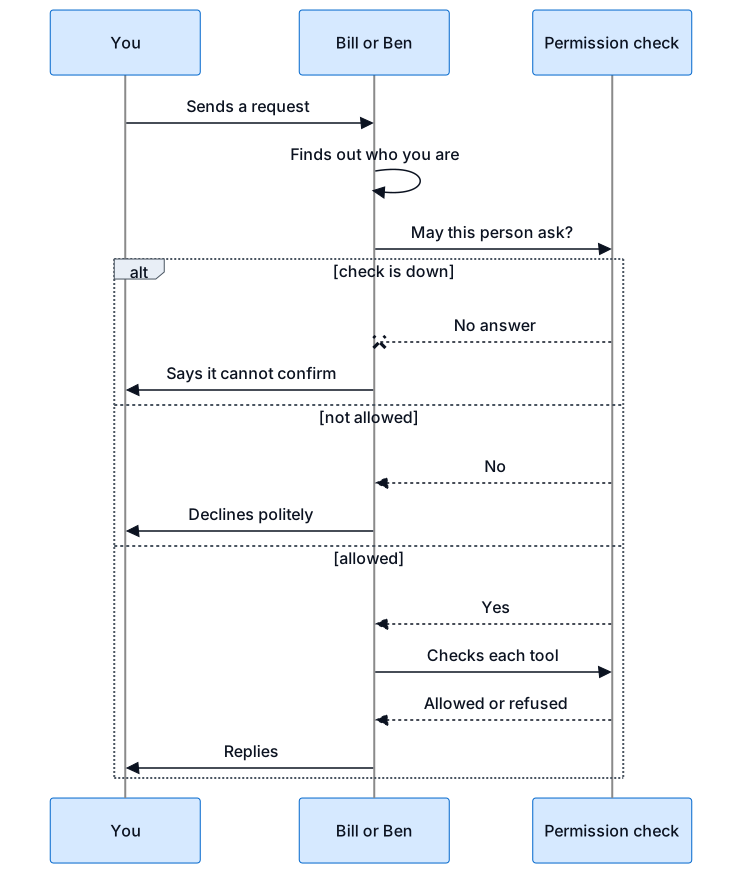
Every request from a chat, a meeting, the gateway or an agent's tool names the tenant, the person, what they want to do, what it is on and where they asked from (Teams chat, meeting voice, gateway, device or web). Before an agent answers a chat message or a spoken command, Bill checks that person against the agent. The speaker must be matched to a user; a display name alone is never enough. Keys and roles: Permissions and roles.
What a refusal looks like
In short: every request is checked, and if the check is down nobody gets an answer.
| Case | Reason | What the person sees | Run starts? |
|---|---|---|---|
| Person holds no key that allows it | no_permission |
the agent's unauthorised policy: one polite line a day (default) | no |
| Not recognised: no link between the Teams id and a platform user, a guest, or an ambiguous match | unknown_subject (the gate forces it) |
the same policy; if a sign-in link is configured, the person may be offered it | no |
| Plan lacks the feature, or its quota is used | plan_feature_missing, quota_exceeded |
the same policy | no |
| Sign-in too weak for the key | weak_identity |
the same policy | no |
| Agent paused | agent_paused |
the same policy | no |
| Tenant restricted, read only or suspended | tenant_restricted, tenant_suspended |
the same policy; reads still work while restricted | no |
| Check down, slow (over 300 ms) or malformed answer | pdp_unavailable |
"I can't confirm what you are allowed to ask me right now ... try again shortly." | no |
The unauthorised policy is set per agent: decline_once (default: one line per person per conversation per 24 hours),
silent, or decline_always. If the policy or the decline ledger cannot be read, the agent stays silent rather than speak twice.
Every deny is written to the audit log by the permission check. The decline itself is recorded too, so the once-a-day state survives a restart.
An unrecognised person can never become an allow.
Answers that allow, with conditions
confirm_out_of_band: a write asked in chat or voice needs an approval card; the agent's tool is blocked until it is approved.summary_only: the gateway may return summaries but not full detail, because the person lacksgateway.detail.full.
Fail-closed behaviour
- Any check error is a deny and starts no run. Tool calls without a valid pass are blocked.
- A write or admin allow whose audit row cannot be saved is turned into a deny.
- Answers are remembered for a few seconds at most (15 s for allows, 5 s for denies); a role change takes effect at once.
- To add or remove a person's rights, change their role in the console. Nothing is redeployed.