Off the record
What this is: how to tell Bill or Ben to stop keeping notes for part of a meeting. Who it is for: everyone in a meeting, and people who answer privacy questions about it. You will learn: the two phrases, what is dropped, what is still kept elsewhere, and who can use the command.
Use it
- Say "Bill, off the record" (or "Ben, off the record"). The bot chats: "Understood, off the record. I'm not keeping notes until you say "back on the record"."
- Say "Bill, back on the record" to resume. The bot chats "Back on the record."
- Only these two phrases count. They must follow the bot's name, like any wake word (Meeting).
What stays private, and what does not
While off the record, nothing is stored, nothing is passed to an agent and nothing is answered. Only "back on the record" is listened for. Each off-record stretch is a gap in the meeting. When the meeting ends, every gap is cut out of the transcript before the summary is written and before the knowledge-base copy is made. An open gap lasts to the end of the meeting. The summary is told that part of the meeting was off the record, so it does not pretend to be complete (Meeting end).
What this does not do:
- The meeting service still holds its own copy of the transcript, and Teams is not told. The command controls only what Bill, Ben and the knowledge base keep.
- Anyone in the call can use it. The command is handled before the permission check, so an unrecognised participant can switch notes off and on. This is the current behaviour, and whether it stays is an open owner decision. An admin cannot turn it off per person today.
How it works
In short: what you say off the record is dropped and never kept.
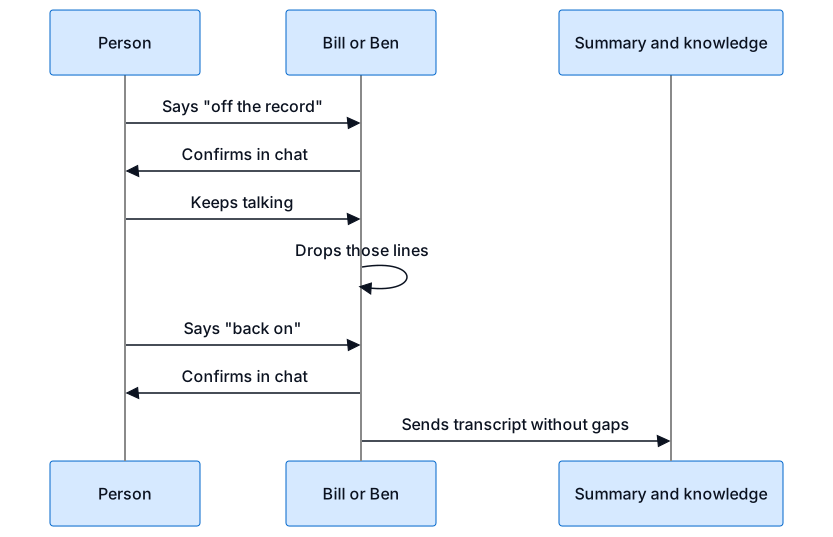
The bot listens for the two phrases after its name. "Off the record" marks the time where the gap starts and "back on the record" closes it. At the end of the meeting every line inside a gap, the command lines included, is removed, and a one-line note about the gap is added to the summary and the knowledge-base documents.